Dashboard
The Dashboard is the first page you see when you log in. It shows how your live campaigns are doing, your most recent campaigns, how much of your plan you've used, what's new in ShortStack, and where to learn more. Get back to it any time by clicking Dashboard in the navigation menu.
Open the Dashboard
You land on the Dashboard when you log in. To get back to it:
- Anywhere in ShortStack: click Dashboard in the navigation menu, or go straight to the Dashboard.
- In the Campaign Builder: click the menu icon (three lines) at the top left, then Home.
What's on the Dashboard
The numbers below match the numbered areas in the screenshot.
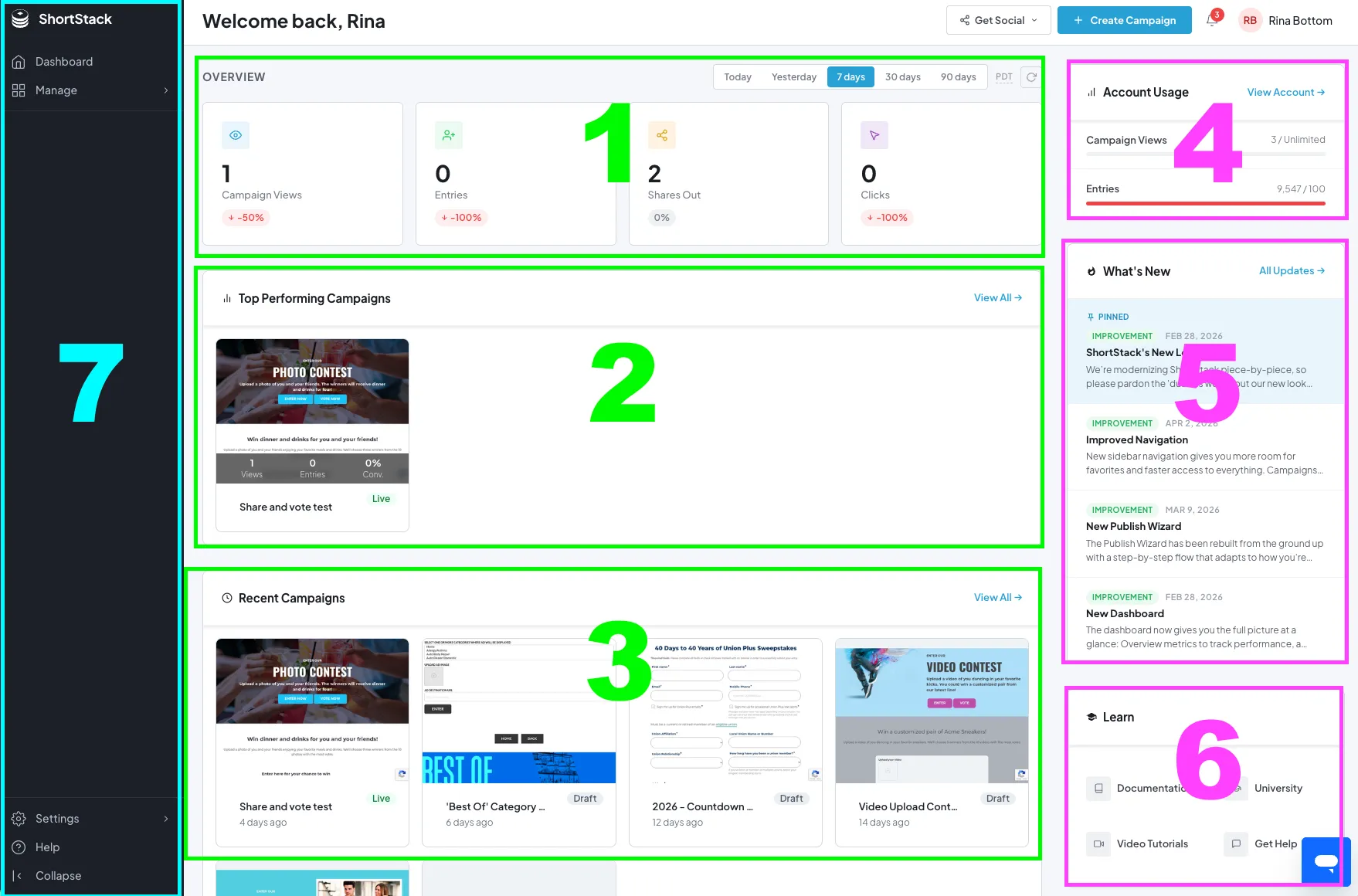
1. Overview
Totals across all your live campaigns: Campaign Views, Entries, Shares and Clicks. For more detail, see the Analytics Manager.
2. Top performing campaigns
Scale plan or higher. Your top three campaigns by views, entries and conversion rate.
3. Recent campaigns
Your latest campaigns. Click a thumbnail or name to open it in the Campaign Builder. On the Scale plan or higher, click the analytics icon to see a summary of how it's doing.
4. Account usage
Your campaign views this month and your stored entries, against your plan's limits. Keep an eye on these to avoid overage charges. See Understanding campaign view and entry limits.
5. What's new
The latest ShortStack updates. Click All Updates for the full list.
6. Learn
Help for getting more out of ShortStack:
- Documentation: the help center.
- University: step-by-step lessons on every part of ShortStack.
- Video Tutorials: short walkthroughs.
- Get Help: ways to reach support.
7. Navigation
The navigation menu down the left side. See Navigating your account.
If something goes wrong
| What you see | What to do |
|---|---|
| A section in the screenshot isn't on your Dashboard | Top Performing Campaigns needs the Scale plan or higher. See Upgrading your plan. |
| The Overview numbers look low | They include live campaigns only. Check each campaign in the Analytics Manager. |
| You can't find the answer you need | Email support@shortstack.com. |
FAQs
Why don't I see Top Performing Campaigns?
It needs the Scale plan or higher. So does the analytics icon on each recent campaign.
How do I get back to the Dashboard from the Campaign Builder?
Click the menu icon (three lines) at the top left of the Campaign Builder, then Home.
Which campaigns do the Overview numbers include?
All your live campaigns together. For one campaign's numbers, see the Analytics Manager.
Related resources
Was this helpful?
Thanks — that helps us decide what to fix next.
Sorry this missed. Tell us what you needed and we'll get you an answer — and fix the page.